Introduction
What is SatTracker?
SatTracker is a desktop display that answers the three questions every satellite operator asks:
When is the next usable pass of the satellite I want to work?
Where should I point my antenna — where does it rise, how high does it get, and where does it set?
What frequency do I transmit and listen on, right now, including Doppler shift?
It shows every satellite you are following on a world map, predicts all of their passes over your location for the next 24 hours, and gives you the details of whichever satellite you select — live, once a second.
SatTracker does not contain a radio. It tells you when, where and on what frequency; you work the pass with your own transceiver and antenna.
Key Features
World Map
Equirectangular world map with coastlines and a live day/night terminator
Up to 12 tracked satellites with their names and a short trail
The selected satellite shows its footprint — the area of the Earth from which it is above the horizon — its recent track, its future track as a dashed line, and the stretch of track where it will next be above your horizon, tagged with the acquisition time
Your home location is marked on the map
Tap a satellite to select it
Pass Prediction
Full SGP4/SDP4 orbit model, calculated on the device — no internet service is needed to predict passes
Next 24 hours of passes for every tracked satellite: acquisition of signal (AOS), time and elevation of closest approach (TCA), loss of signal (LOS), and the azimuths at each
A 12-hour pass timeline showing every satellite's passes at a glance, with good passes highlighted
A sortable upcoming-passes table
A polar sky plot of the selected satellite's next pass, with its live position during the pass
Accuracy verified against the reference implementation to within about a second
Frequencies, Modes and Doppler
Uplink and downlink frequencies, mode (FM, SSB/CW, AFSK, …), CTCSS tone and inverting/non-inverting transponder type for each satellite
Built-in data for 33 workable amateur satellites
While a satellite is overhead the frequencies are Doppler-corrected live: the downlink shows where to listen, and the uplink shows where to transmit so that the satellite hears you on its nominal frequency
Pass Alerts
Choose which satellites raise alerts
Define a good pass by its maximum elevation (e.g. 30° or higher)
An alert banner appears a configurable time before AOS (e.g. 10 minutes) and again at AOS, with the satellite's frequencies — and it wakes the screen if night mode has turned it off
The top bar always shows what is above your horizon now (with the time until it sets) and the next good pass with a countdown to it
Two Display Themes
NEON — a futuristic holographic HUD: deep-space background, cyan and magenta neon, glowing coastlines and a comet-tail trail
OPS — a hi-tech mission-control console: charcoal panels, crisp white and amber, a labelled latitude/longitude grid and five-minute ticks along the satellite track
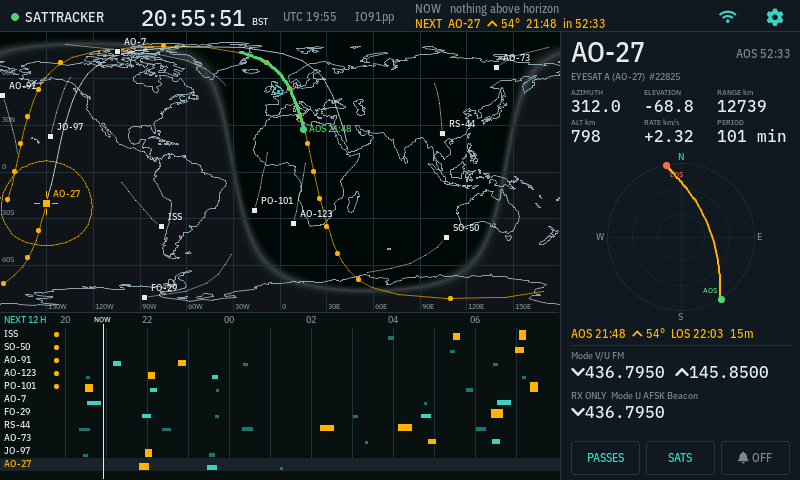
The main screen in the OPS theme.
Connectivity and Updates
2.4 GHz WiFi, set up on the touchscreen or from a phone
Up to 3 saved networks, joined automatically
Clock synchronised over the internet (NTP) — accurate time is essential for satellite tracking
Orbital data refreshed from CelesTrak every day and kept in flash memory, so the device keeps predicting through an internet outage
Over-the-air firmware updates from TopBytes
How It Works
CelesTrak (orbital elements) ──HTTPS, daily──▶ SatTracker ──▶ flash cache
NTP time servers            ──UDP, at boot──▶     │
                                                  ▼
                               SGP4 orbit model + pass search (on device)
                                                  │
                  ┌───────────────────────────────┼───────────────────────────┐
                  ▼                               ▼                           ▼
              World map                   Pass timeline / list        Detail panel
        (positions, tracks,             (24 h of passes for          (az/el, sky plot,
         footprint, night)               all tracked sats)           Doppler frequencies)
Once a day SatTracker downloads the current orbital elements (two-line element sets) for the amateur-radio satellites from CelesTrak and stores them in flash.
Every second it computes the position of each tracked satellite and its direction and distance from your home location.
In the background it searches the next 24 hours for passes over your location.
The display shows the results; alerts fire from the predicted passes.
Use Cases
Working FM satellites — know which of SO-50, AO-91, AO-123, PO-101 and the ISS pass high over you today, and see the dial frequency to set as Doppler shifts.
Linear transponders — see the passband for RS-44, FO-29, AO-7 or JO-97 and follow the Doppler-corrected passband centre during the pass.
Planning — a glance at the timeline shows the best passes of the evening.
Not missing passes — let the alert tell you ten minutes before a good one.
QO-100 — see the geostationary satellite's fixed azimuth and elevation from your location.
Shack display — a striking always-on display of what is overhead.
System Requirements
Hardware
SatTracker device
USB-C power supply (5 V, 1 A minimum)
Network
2.4 GHz WiFi (802.11 b/g/n). 5 GHz-only networks are not supported.
Internet access for the time server, orbital data and firmware updates (outbound HTTPS on port 443, NTP on UDP port 123).
Once orbital data has been downloaded, pass prediction continues to work without an internet connection for several days. The clock must have been set from the internet since the device was last powered on.
Next Steps
Set up your device in Getting Started
Learn to read the screen in Operation
Choose satellites, alerts and display options in Configuration